
The Advanced Search feature allows you to find documents that have been migrated from the previous FPDC system.
Click
on
top of the FPDS-NG Navigation screen. The
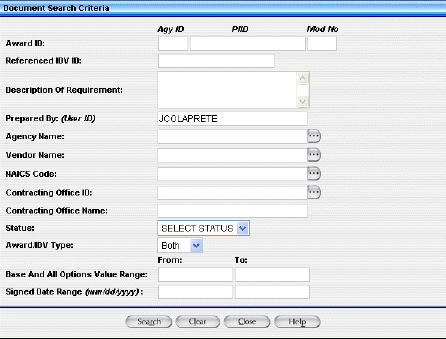
Advanced Search screen will display. See
an example below.
Click
to
remove the default settings.
Enter the search criteria. You may use a % as a wildcard to supplement incomplete or unknown values, but this will increase search time.
For migrated IDVs, the PIID is the same as the original contract number.
For migrated Awards, the PIID is a combination of the:
Contracting Office Code
Action Date (format "YYYYMM")
Contract Action Type (A, B, C, D)
Order Number (if it exists), and the
Contract Number.
The Contracting Office code must be 5 characters. Add as many leading zeroes as needed.
The Action Date is in the format "YYYYMM."
The Contract Action type is a single character representing the Award Type:
A - BPA Call
B - Purchase Order
C - Delivery/Task Order
D - Definitive Contract
Example. To find a Delivery Order created in October 1995 with:
Agency - U.S. Coast Guard (6950)
Contracting Office - 23
Order Number - DTCG2394FTACX01
Contract Number - DTCG2391DTTMB12
The PIID would be calculated by the following:
"00023" (Contracting Office ID with leading zeroes)
+ "199510" (Action Date in YYYYMM format)
+ "C" (Contract Action type - Delivery Order)
+ "DTCG2394FTACX01" (Order Number)
+ "DTCG2391DTTMB12"
(Contract Number)
The PIID would equal 00023199510CDTCG2394FTACX01DTCG2391DTTMB12. See
an example below.

Click
.
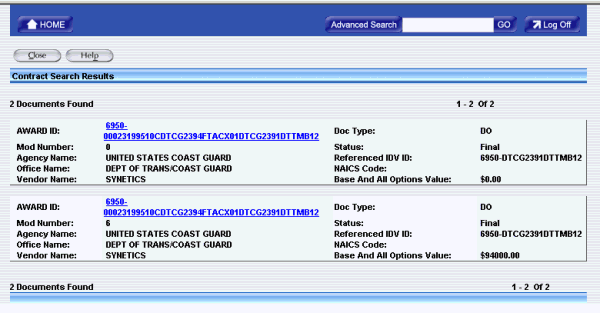
A list
of documents will display. See
an example below.
Click the document you want.